CRM for tutors: track where your students come from
You posted on Instagram, a friend recommended you, you ran a small Google ad in the spring. Now you have fourteen people in various stages: some had a trial and vanished, some pay every month. Which of those sources actually brings students who stay? Most tutors answer from memory, and memory favors the last thing that happened.
On the Pro plan, verbios keeps this record for you. It follows every student from first contact to regular lessons, and the whole thing lives where you already work.
Tracked links tell you the source
Every link you share can carry a channel and a campaign. In your profile settings, open the Funnel section under your public link, pick a channel (Instagram, Telegram, Google, Referral or one of your own) and a campaign (say, spring intensive), and copy the result. Lessons, courses and marathons have the same builder next to their share links.
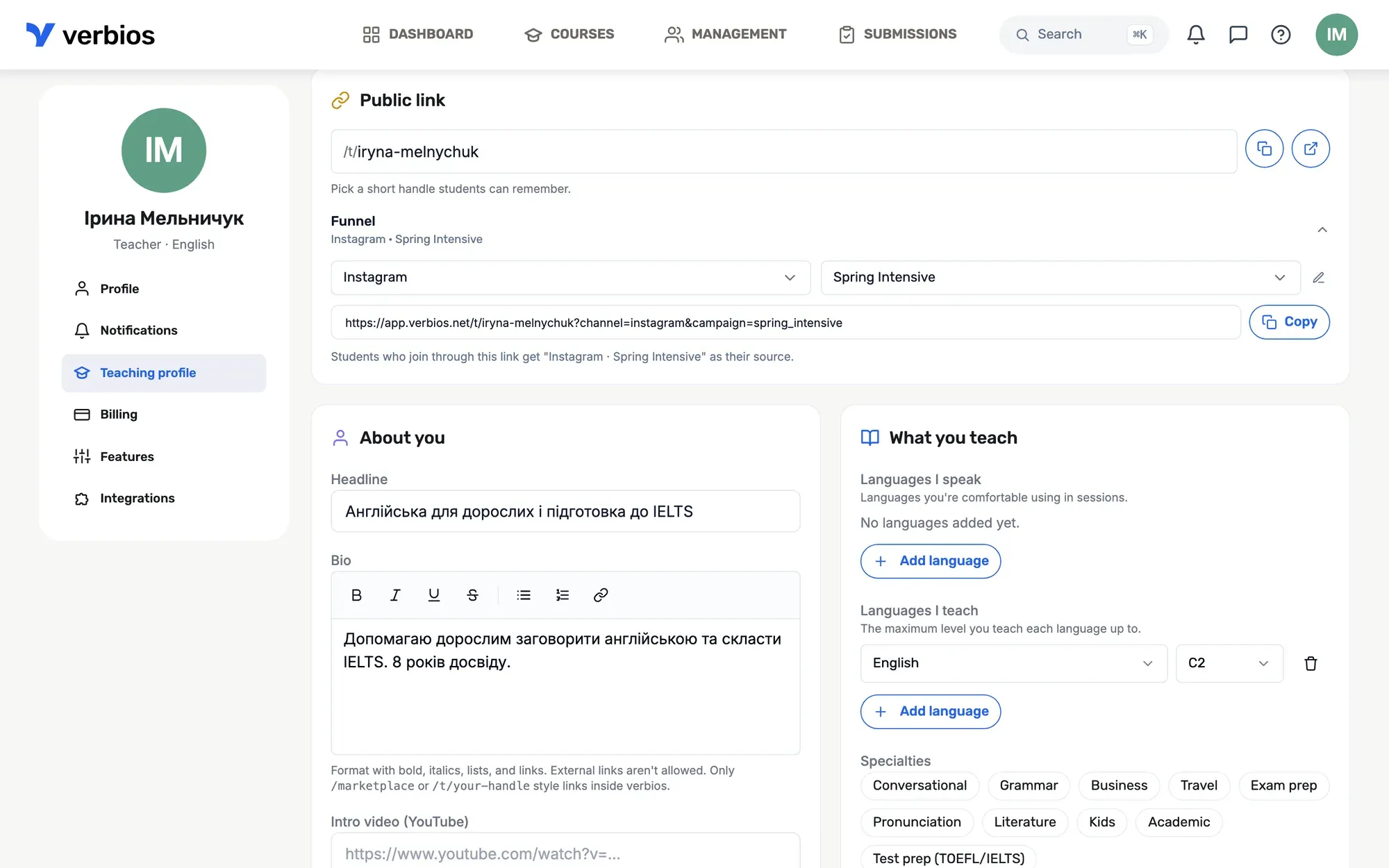 The link builder: pick a channel and a campaign, copy the link, and every student who joins through it gets that source.
Put the Instagram version in your bio and the Telegram version in your channel description. A student who signs up through either one arrives with the source already filled in, and nobody has to remember to ask “how did you find me?”
Channels and campaigns you no longer use can be hidden or deleted. Hidden ones disappear from the dropdowns and the link builder but stay in your reports.
A Lifecycle tab on every student
Open a student and you will find a Lifecycle tab among the profile tabs. It holds what a CRM card would hold:
- The funnel stage: lead, trial booked, trial completed, converted student, or lost. You can add your own statuses with “Manage statuses”.
- The channel and campaign, who recommended the student, and a follow-up date.
- Collected and estimated lifetime value. Collected is the sum of payments you recorded. The estimate assumes a 12-month average lifetime until three of your students have finished, and uses your own history after that.
- For lost students, the reason: price, schedule, stopped showing up, chose a competitor, reached their goal, and so on.
- Comments and a timeline of changes.
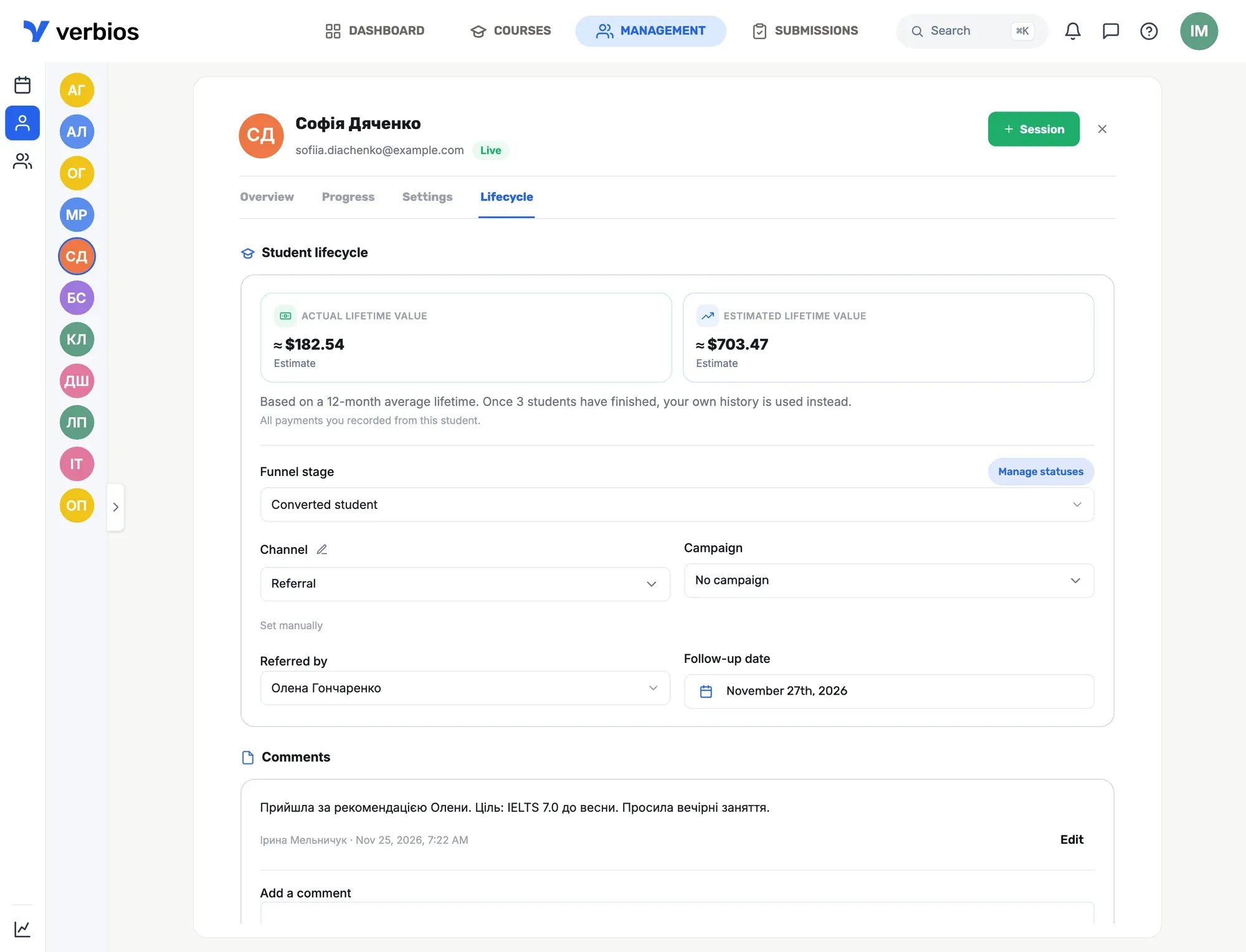 The Lifecycle tab: lifetime value, funnel stage, source, who recommended the student and the next follow-up date.
The follow-up date is the part tutors use most. Put a date on a lead you spoke to, and when it arrives the student shows up in the “Needs attention” list instead of fading out of your head. Trial lessons, by the way, no longer use a student’s lesson balance.
The Lifecycle view in Insights
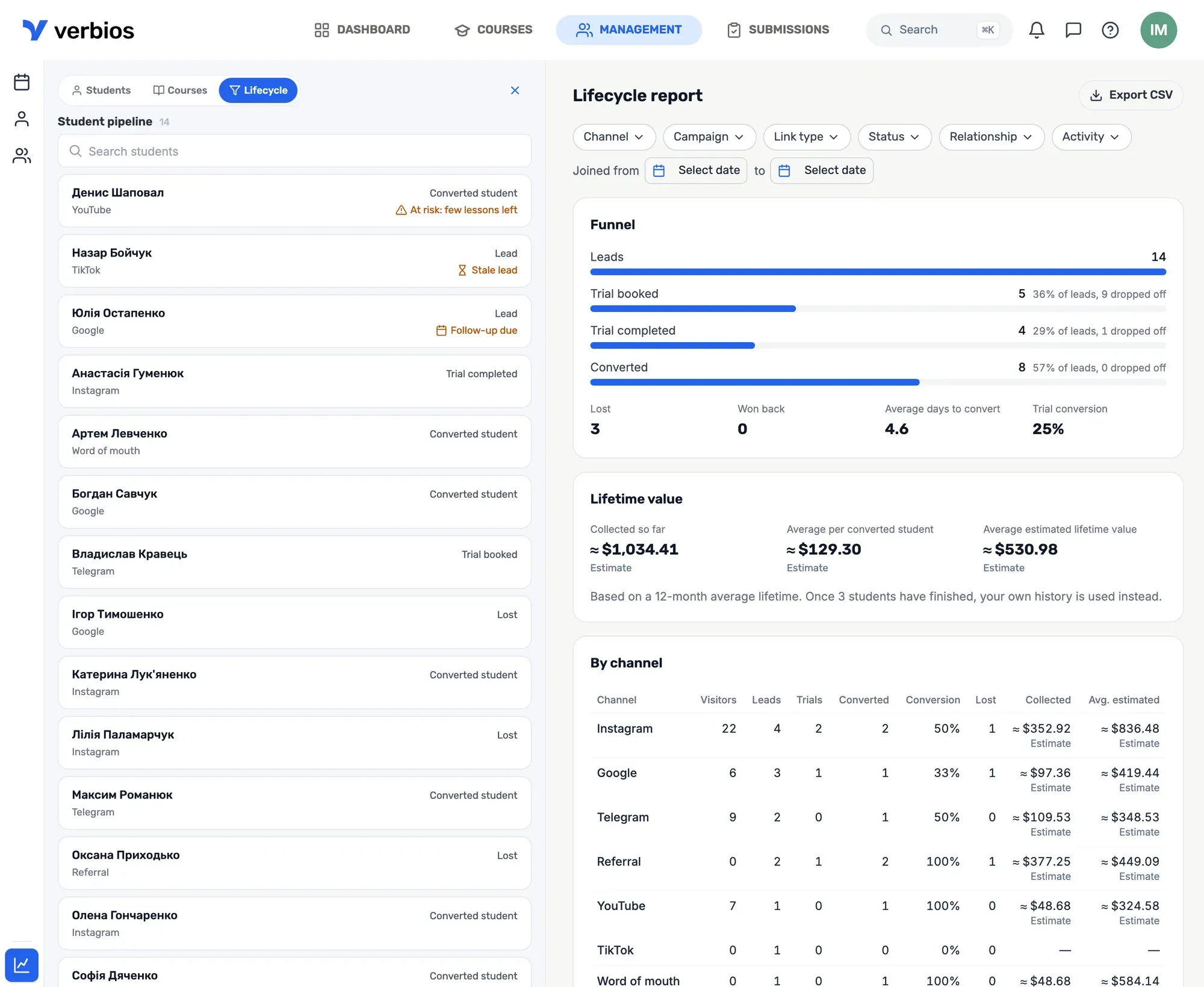
Open Insights and switch to Lifecycle. On the right is the report. At the top is the funnel: leads, trial booked, trial completed, converted, with the share of leads at each step and how many dropped off. Under it you see lost and won back counts, average days to convert and trial conversion.
Further down come lifetime value, then tables by channel and by campaign: visitors, leads, trials, converted, conversion, lost, and money collected. This is where the question from the start gets answered. On the left is the pipeline, a list of every student with their stage and flags such as follow-up due, stale lead, or few lessons left.
The report also has a win-back list of lost students you could contact again, a breakdown of why students were lost, and referrals. Filters narrow it by channel, campaign, link type, status and join date, and Export CSV gives you the rows for a spreadsheet.
Ask your AI assistant about your students
If you connect Claude, ChatGPT or another assistant to verbios, you can also share your student CRM data with it, read-only. Then you can ask who needs a follow-up this week, which channels bring students who stay, or how trial conversion is going. The option is a checkbox on the new connection, off by default, and it applies only to the connection where you tick it.
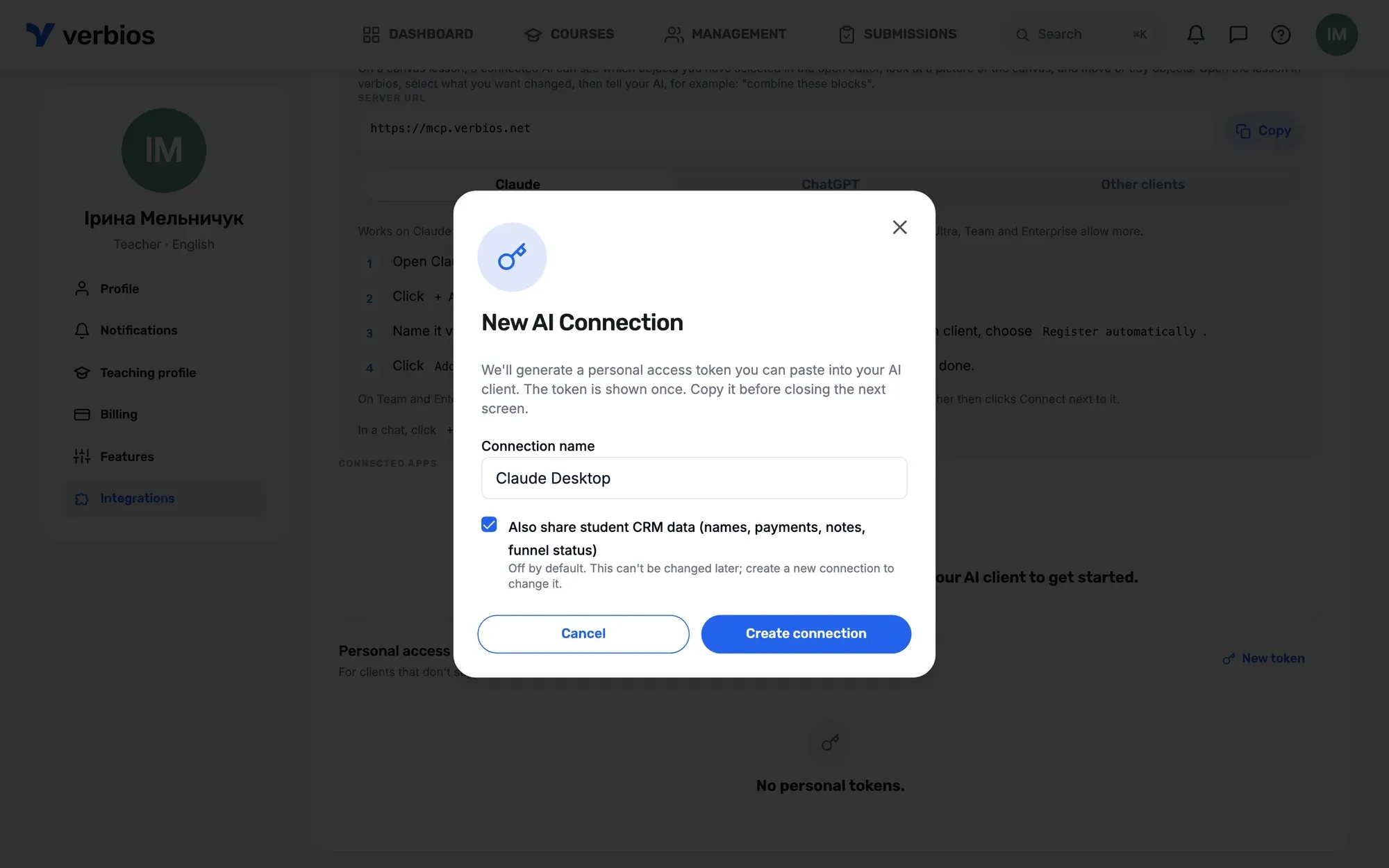 Student data stays off unless you tick the box when you create a connection.
An example: where Iryna’s students come from
Iryna teaches IELTS preparation and has 14 people in her pipeline. In her report, Instagram brought the most visitors, 22, but only two of its four leads became students. Referrals brought just two leads, and both converted. Google gave three leads and one student, and the lost students cite price and schedule. She stops posting every day and asks her current students to recommend her instead, with a small thank-you. Two weeks later the win-back list reminds her of a Google lead who left after the trial because of a changed work schedule, and she writes with a new time slot.
If you also track what students pay, student payments tracking feeds the lifetime value numbers. For the bigger picture, see running a tutoring business.
The student lifecycle is part of the Pro plan. See the plans and try it with your own links.
Frequently asked questions
Who gets the student lifecycle and CRM features?
Pro teachers and school admins. The tracked link builder, the Lifecycle tab in each student profile and the Lifecycle view in Insights are part of the Pro plan.
How does verbios know where a student came from?
You add a channel and a campaign to your profile, lesson, course or marathon link. Students who join through that link get the source filled in automatically. You can also set or change it by hand on the student's Lifecycle tab.
Can my AI assistant see my student data?
Only if you allow it. When you connect Claude, ChatGPT or another assistant, student CRM data is off by default. You tick a box for that one connection, and the access is read-only.