How tutors can track student payments and lesson balances
Ask a tutor how they track payments and you will hear about a notes app, a spreadsheet, a screenshot of a bank transfer and a good memory. It works until a student says “I paid for ten lessons, didn’t I?” and you cannot say how many are left. The Payment tab in a student’s profile replaces that with one number you can trust.
A balance per student
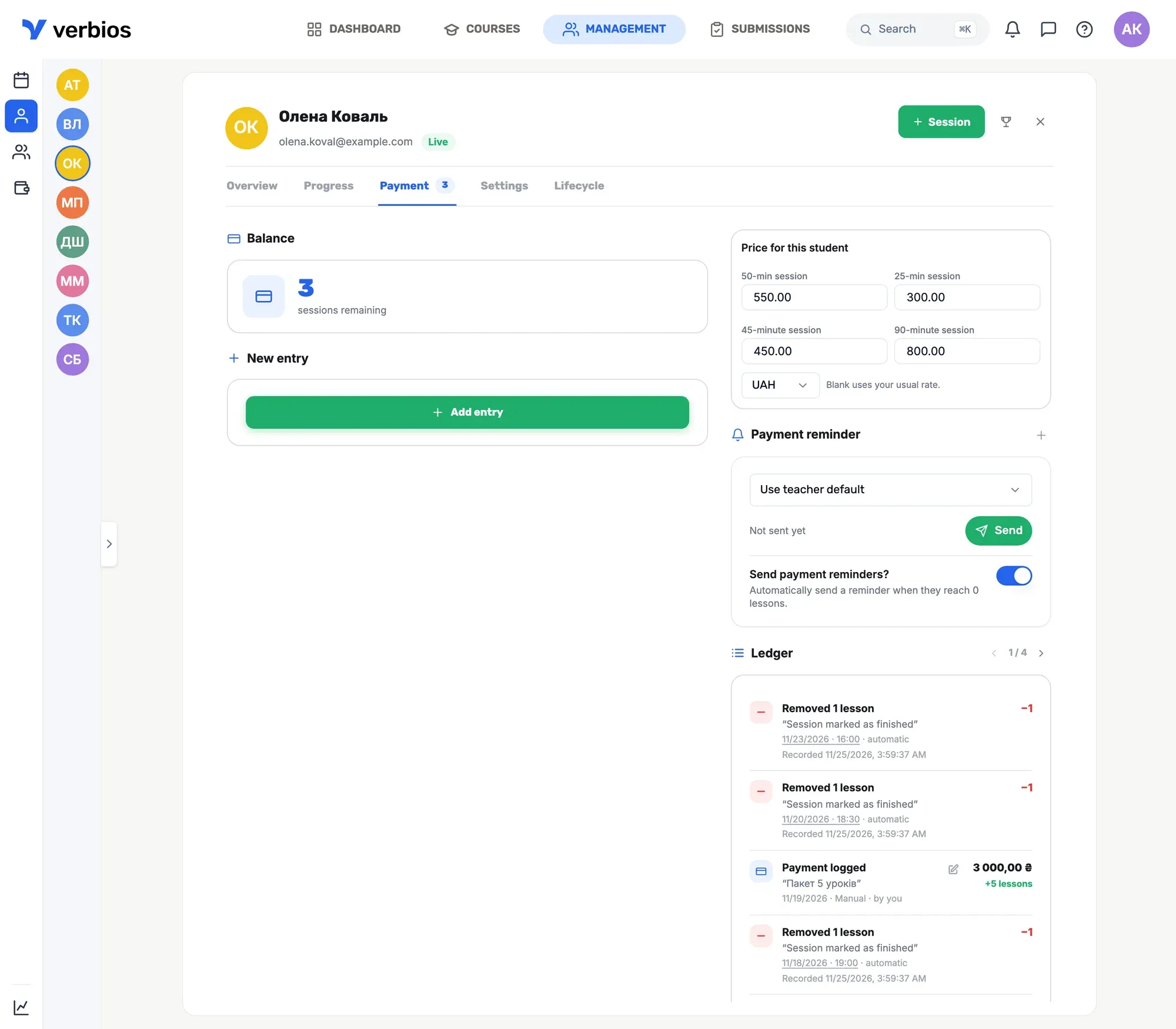
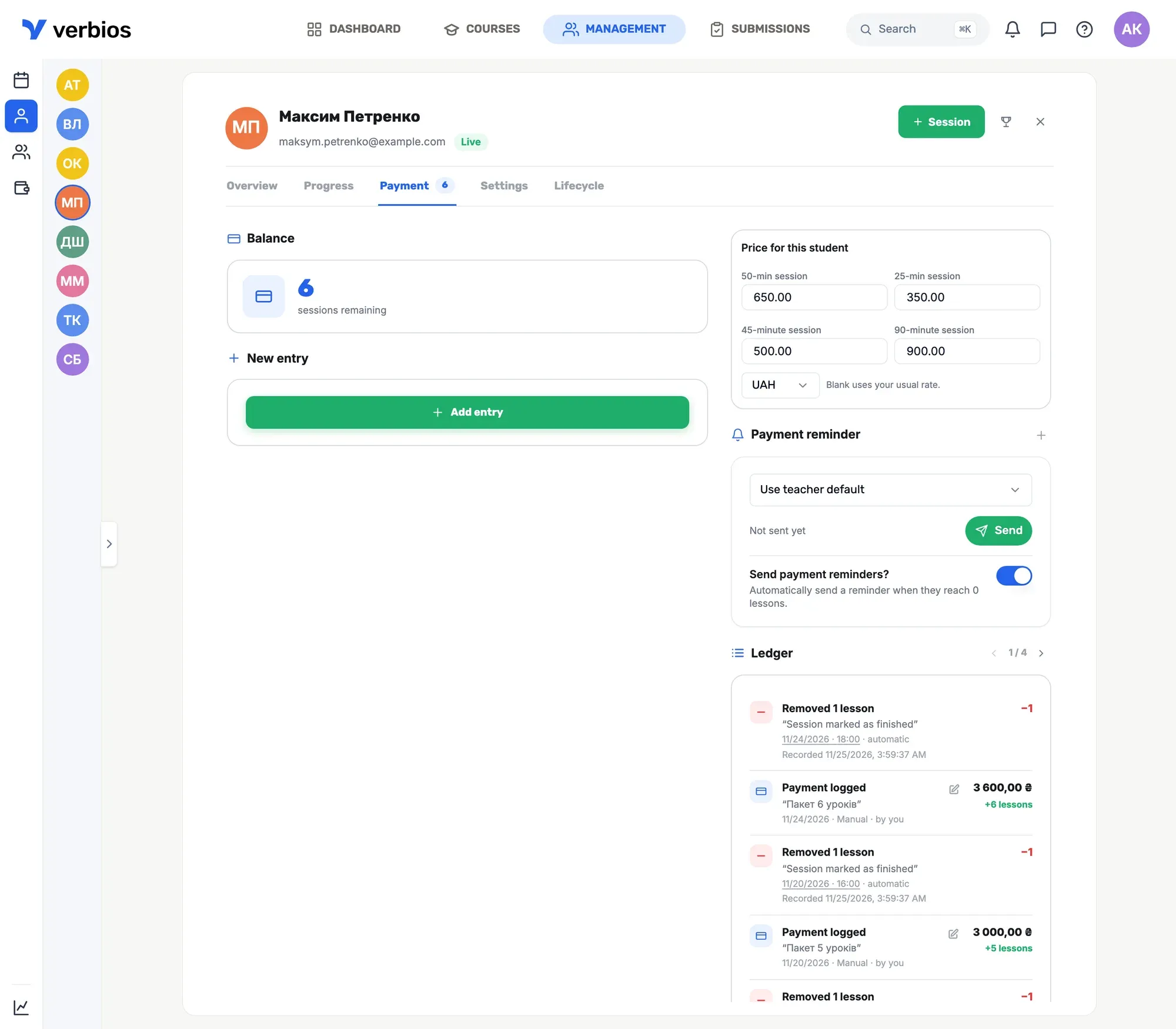
The student profile is a tabbed panel: overview, progress, payment, settings and lifecycle. On the Payment tab you see how many lessons the student has left and add a record whenever they pay, including payments that happen outside verbios, such as a bank transfer or cash. The balance goes down as lessons are taught, so you always know where a student stands.
The Payment tab: lessons left, a button to add a record, personal prices, payment reminders and the ledger of lessons and payments.
Not every student should be tracked. A child whose parent pays the school monthly, or a friend you help for free, does not need a lesson ledger. Each student has a “Track payments for student?” switch. Turn it off and their remaining lessons, ledger and low-balance alerts are hidden, for you and for them. Students you were already tracking keep working as before.
Personal prices, for any lesson length
Teachers and schools can offer the lesson lengths they actually teach, such as 45 or 90 minutes, and set a price for each. Students and parents see those lengths and prices when they book. On top of that, you can set a price for one student alone, in any currency, even when that student does not pay through verbios. That price is the suggested amount when you invoice them, and if you collect through your own connected payment provider, it is what that student is charged. Leave the fields empty to go back to your usual rate.
 Personal prices per lesson length. Empty fields mean your usual rate.
This matters when you have an old student on a loyalty rate, a sibling discount, or a long 90-minute format that costs more than twice the short one.
Reminders that sound like you
The billing tools include reminders from reusable templates, and you can send one with a click when a student’s balance runs low. Reminders can also go out automatically when 0 lessons remain, and you turn that on per student with the “Send payment reminders?” switch, instead of one setting for everyone. Reminder emails arrive from verbios in the usual email layout with payment buttons and notification settings, but the message is yours, with a clear disclaimer and no verbios sign-off. On your dashboard, items such as “1 paid lesson left” sit under Needs attention with a Remind button.
When students pay in verbios
If you want payments to happen in the platform, connect your Monobank, WayForPay or Stripe account. Students then pay right in verbios when they book, payments are tracked for you, and you keep 100%: verbios takes 0%. The rest of the setup above, balances, prices and reminders, works the same way whether money arrives through a provider or on your card.
A realistic month
Anna teaches 14 students. Two are children whose parents pay her directly each month, so she switches tracking off for them. Ten pay for packs of four lessons by card transfer: she adds a record when the transfer arrives and the balance reads “4 lessons left”. One student takes 90-minute lessons at a special price. When the balance of another reaches zero, the dashboard shows a reminder card and she sends the template message. At month end she opens the dashboard and sees what she received, without opening a bank app.
See how scheduling feeds into this in the teaching schedule, or read about parent accounts if parents pay for the lessons.
Try it with your own students on verbios. Starter has a 7-day free trial.
Frequently asked questions
Can I track payments that students make outside the platform?
Yes. You can record payments made off-platform and keep a lesson balance for each student.
Can I track payments for only some of my students?
Yes. Each student has a "Track payments for student?" switch on the Payment tab. Turn it off for students you do not bill by the lesson, and their balance, ledger and low-balance alerts are hidden for both of you.
Does verbios take a commission on lesson payments?
No. If you connect your own Monobank, WayForPay or Stripe account, students pay you directly when they book, and verbios takes 0%.